

Macromise
Features
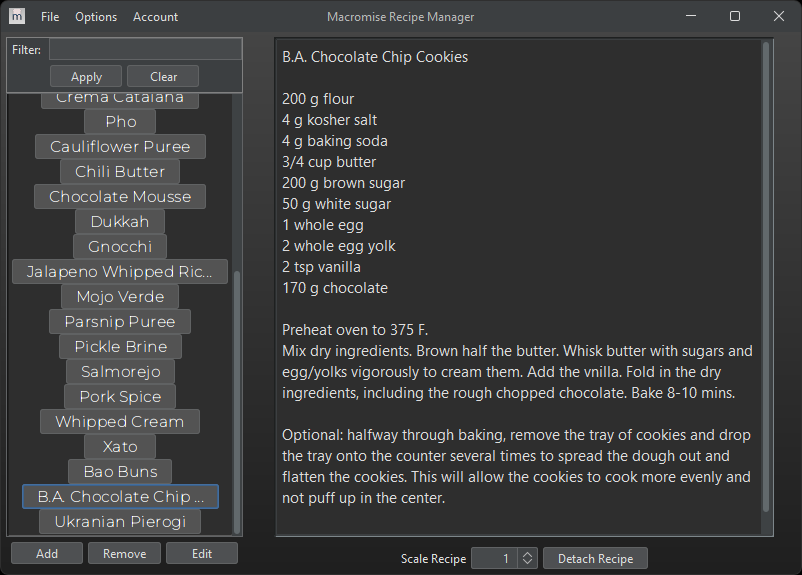
- Basic CRUD functionality; recipes are uploaded to a local persistent database as well and backed up to disk.
- Recipe scaling: recipes can be scaled up for cooking in volume. All measurements are reduced to lowest common denominator to allow for easy reading of volume
- Import/export: recipe lists can be exported to and imported from a custom file format that is parsable by the application
- Light and dark theme
- Bilingual (English and French)
- Auto backup: when the application is closed, recipes are backed up to disk. If an internet connection is not available when the application is next started, recipes will be read from backup instead
Skills Applied
- UI design (done in Figma with a free account)
- Database design
- Password management/encryption
- File I/O, custom parsing
- OOP, MVP, Data Structures, GUI programming
Background
Having spent years working in professional kitchens, I often found it frustrating that no matter where I worked, it was often hard or impossible to find consistent recipes. Recipes were often stored in binders, Google docs, random sheets of paper, or on the phones of the cooks. Up-to-date recipes were, more often than not, stored on the phones of the cooks who prepared them every single day.
This, unfortunately, makes sense. Executive chefs, while responsible for the recipes, are also busy with running the rest of the restaurant. The last thing they want to do at the end of a 14-hour day is sit down at a computer and spend time collating recipes from across a staff of 20+ cooks and 3 or 4 different documents.
This is where Macromise comes in. Cooks will still keep recipes on their phones, but they will create them and update them via this application instead. When they create a new recipe or edit an existing one, it will send a notification to the chef’s “master” application (usually running on Desktop, but mobile will be available too) to either approve/reject/modify the recipe. Once approved, it will be added and made available to the rest of the users connected to the database for viewing.
No more guessing where the “correct” recipe is, no more different versions of the same recipe. Everything kept in one place that is easy, quick to use and is always in your pocket.
What I learned
I learned a lot about UI development for this project. I am not a graphic designer by any stretch, but I did try to take inspiration from other UIs that I found pleasing to use/look at. I used Figma to draft up the different screens of the application and then let Java Swing handle the drawing. I could have gone for JavaFX, but for now, and for the my needs, Swing is plenty. I also used Figma for drafting up icons, button images, and for testing fonts.
Databasing was/is a big task for this application. To start, I simply hosted a local database via JDBC. This choice was made with the knowledge that I will have to gut that section of the code when it comes time to host information on a “real” database, but I decided to make that sacrifice early on for speed of development.
User management/password handling was not something I had seriously worked on before, but I learned a lot about handling passwords; mostly, to “never do it.” I did, however, just to get used to using encryption algorithms (BCrypt was used here), hashing, and salting.
While it may not be a massive feature, trying to handle and account for how a user might type a recipe in (ingredients, specifically) was a big consideration. I had to account for the different metric systems, the different styles of writing recipes, and think of how the application would handle and parse all of this.
Source Code: View on Github